
Build code registry
把 code 推到 github 教學很多,可以 google 一下,不過要注意的是現在推 code 都要先在官網申請 token,新手很容易卡在這。
ways to build image and push
執行 CI 前,要確認有 Dockerfile 並且在地端可以 docker run 服務起來,CI 過程會用該 Dokcerfile 產生 image。
way1. build image and push from local side by docker command,use CI after to renew
在地端 build 完,然後推到 github container registry(需要用 github ui 建立 token,並給 token) ,然後把 token 存到 txt 檔
用 token 登入 github
cat token.txt | docker login ghcr.io -u suyuying --password-stdin
-u 換成自己的 username
token.txt把 token 放在裡面
- 推 image 到 github container registry DONe
docker buildx build --platform=linux/arm64,linux/amd64 --push -t ghcr.io/suyuying/fastapi-backend:1.0 .
這個方法當下沒啥問題,會成功建立,如果以上方法要接CI,還有 step 4.
image,但之後接 CI 的時候會
遇到權限問題,貌似用 token 建立以後,你 CI 裡面使用 registry 的 password: ${{ secrets.GITHUB_TOKEN }} 的 token 會失效,原本 issue 位置
4.請前往 $yourOrganization → Packages → $yourPackage → Package settings(右側/底部),並配置“管理操作訪問"部分以允許有問題的 git 存儲庫對此包 code 存儲庫有 write 權限
way2. use CI to create and push image first, and afterwards
1.在.github/workflows 資料夾建立 xxx.yml 檔案,內容
# This workflow uses actions that are not certified by GitHub.
# They are provided by a third-party and are governed by
# separate terms of service, privacy policy, and support
# documentation.

# GitHub recommends pinning actions to a commit SHA.
# To get a newer version, you will need to update the SHA.
# You can also reference a tag or branch, but the action may change without warning.

name: Create and publish a Docker image

on:
  push:
    branches: ['main']

jobs:
  build-and-push-image:
  // 這個是之後示範import config environment variable ,optional
    environment: prod
    runs-on: ubuntu-latest
    permissions:
      contents: read
      packages: write
    // 這個是建立這份文件的env變數
    env:
      Greeting: Hello

    steps:
      - name: Checkout repository
        uses: actions/checkout@v3

      - name: Log in to the Container registry
        uses: docker/login-action@f054a8b539a109f9f41c372932f1ae047eff08c9
        with:
          registry: ghcr.io
          username: ${{ github.actor }}
          password: ${{ secrets.GITHUB_TOKEN }}
    //這邊的secrets要用Actions secrets and variables設定
      - uses: mr-smithers-excellent/docker-build-push@v6
        with:
    // 這邊格式就記下來,因為他官網寫的也不清不楚的,這樣會做出ghcr.io/suyuying/fastapi-backend
          image: fastapi-backend
          registry: ghcr.io
          username: ${{ secrets.GHCR_USERNAME }}
          password: ${{ secrets.GHCR_TOKEN }}
- 放變數值到 github repo 上
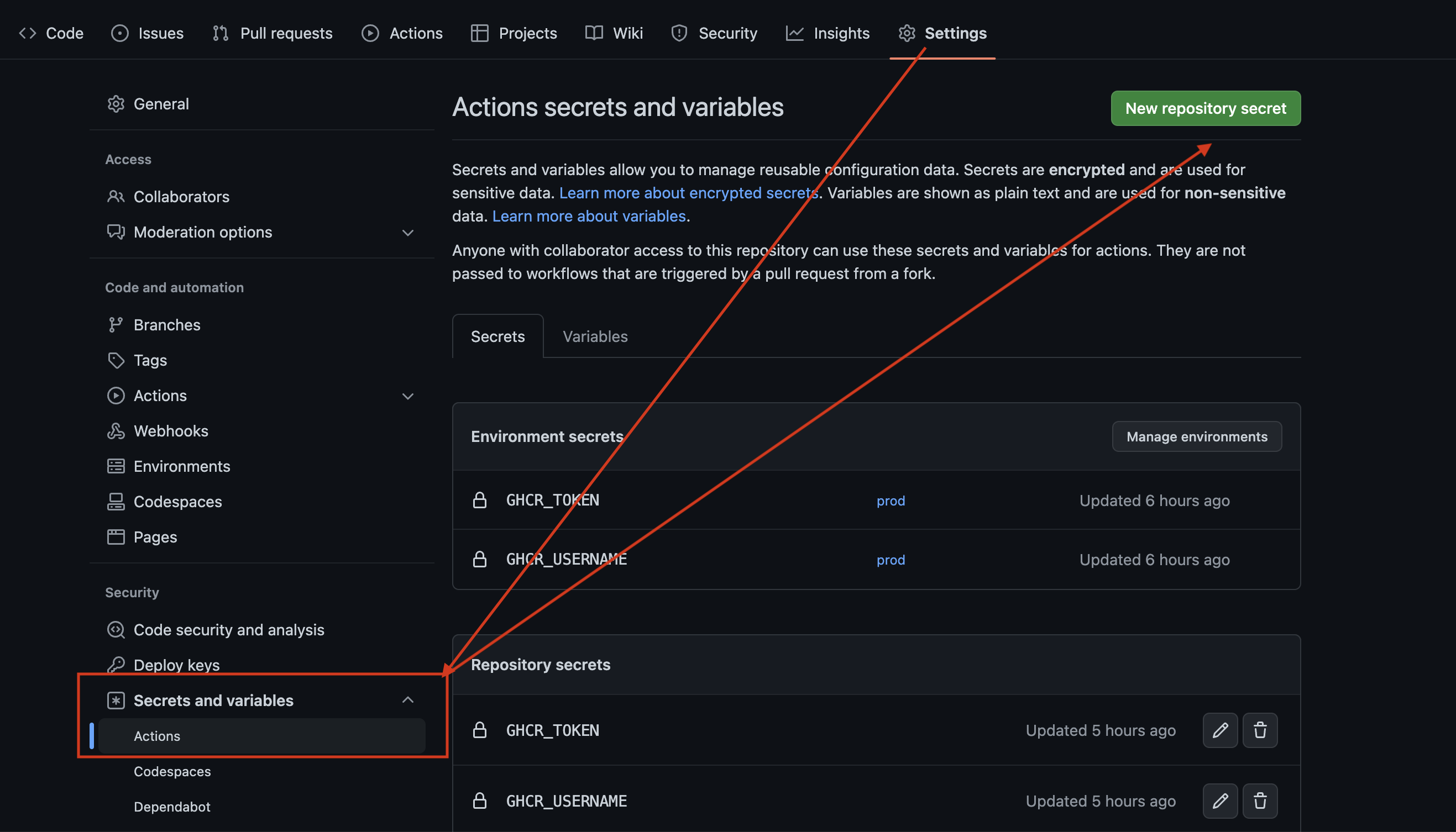
GHCR_USERNAME="yourUserName"
GHCR_TOKEN="classic token 產出的 token"
可以用 Environment secrets 或 Repository secrets
對 workflow 而言他們都會放在 secrets 這個物件裡面,
使用方式向是
${{ secrets.GHCR_TOKEN }}
- 因爲條件設定 push main,所以確認好 main branch 直接推就會發現有新作 image 了
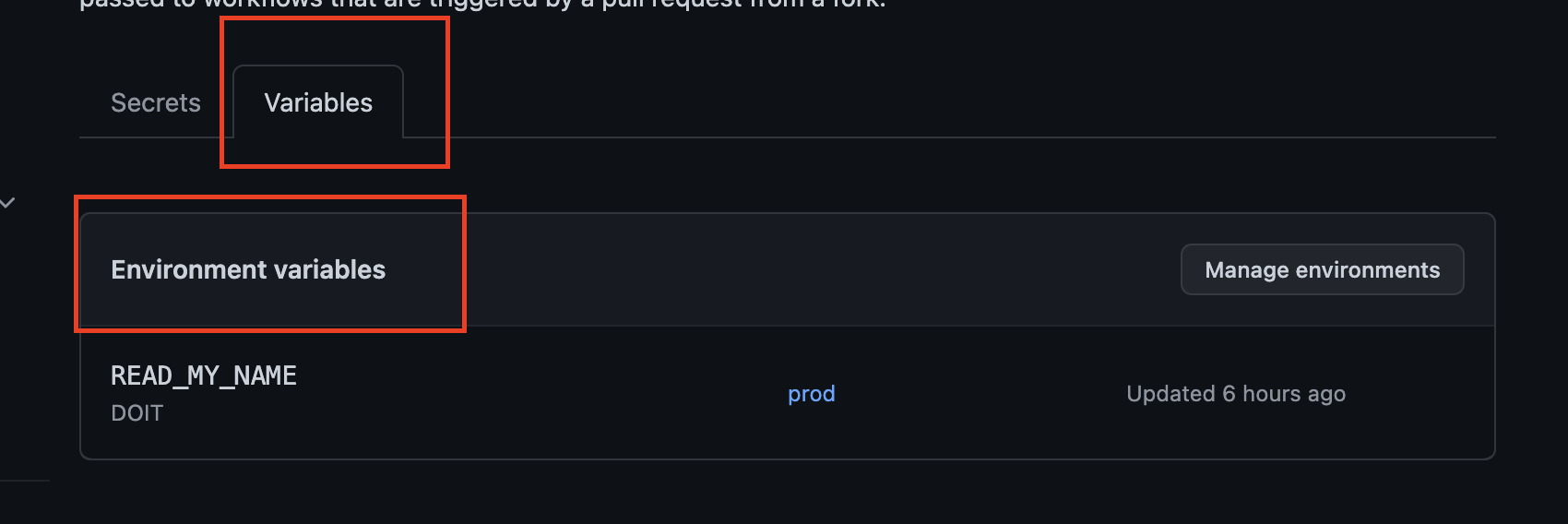
如果要使用上面再 environment 環境變數取值,要使用這種格式
${{ vars.READ_MY_NAME }} 去取值
github action 提供了一大堆 context,參考資料 ,不知道為啥網路講到這個資源很少
官網教學 CI build image 推到 container registry 使用的是另一個 action,兩個都用過,都可以用。 參考 actions
# This workflow uses actions that are not certified by GitHub.
# They are provided by a third-party and are governed by
# separate terms of service, privacy policy, and support
# documentation.

# GitHub recommends pinning actions to a commit SHA.
# To get a newer version, you will need to update the SHA.
# You can also reference a tag or branch, but the action may change without warning.

name: Publish Docker image

on:
  release:
    types: [published]

jobs:
  push_to_registries:
    name: Push Docker image to multiple registries
    runs-on: ubuntu-latest
    permissions:
      packages: write
      contents: read
    steps:
      - name: Check out the repo
        uses: actions/checkout@v3

      - name: Log in to Docker Hub
        uses: docker/login-action@f054a8b539a109f9f41c372932f1ae047eff08c9
        with:
          username: ${{ secrets.DOCKER_USERNAME }}
          password: ${{ secrets.DOCKER_PASSWORD }}

      - name: Log in to the Container registry
        uses: docker/login-action@f054a8b539a109f9f41c372932f1ae047eff08c9
        with:
          registry: ghcr.io
          username: ${{ github.actor }}
          password: ${{ secrets.GITHUB_TOKEN }}

      - name: Extract metadata (tags, labels) for Docker
        id: meta
        uses: docker/metadata-action@98669ae865ea3cffbcbaa878cf57c20bbf1c6c38
        with:
          images: |
            my-docker-hub-namespace/my-docker-hub-repository
            ghcr.io/${{ github.repository }}

      - name: Build and push Docker images
        uses: docker/build-push-action@ad44023a93711e3deb337508980b4b5e9bcdc5dc
        with:
          context: .
          push: true
          tags: ${{ steps.meta.outputs.tags }}
          labels: ${{ steps.meta.outputs.labels }}